Posted

Foremost, it has some strange issues. But if you want to give it a try, go ahead.
xRdp will create its own X11 instance, and as far as I know, brings its own X11 server. However, this comes with a caveat. Every program I tried could only be started either on the host or on the client, but never on both at the same time.

  • Sometimes the keyboard does not work well; keys don’t do what they should do, or the whole keyboard does not work at all.
  • The resolution is not changeable (my workaround is to scale it to 75%).
  • I have no sound, but I also have not configured it; therefore, this could be a configuration issue.

Although cosmic and xwayland ignore the xorg configuration files, the xserver from xrdp may use them. So, I will try it and extend this article with my findings.

My current system:

Host:

  • PopOS 24.04 with Cosmic
  • Kernel 6.16.3-76061603-generic #202508231538~1759252525~24.04~c08ae99 SMP PREEMPT_DYNAMIC Tue S x86_64 x86_64 x86_64 GNU/
  • xrdp 0.9.24

Remote System:

  • Windows 11 with mRemoteNG
  • PopOS 22.04 LTS with Remmina

Installation Guide

Update System (optional):

sudo apt update
sudo apt list --upgradable
sudo apt upgrade

Install xRDP
sudo apt install xrdp

Configure xRDP

echo "cosmic-session" > ~/.xsession
systemctl enable xrdp
systemctl start xrdp
Author

Posted

Use this formula for pixel movement, they told me. It will work, they told me. Yep, no.
After all, it makes totally sense why this can not work, but later more.

fun rotateCoordinate(point: Coordinate, center: Coordinate, angleDegrees: Double): Coordinate {
    val angleRadians = toRadians(angleDegrees)

    val dx = point.x – center.x
    val dy = point.y – center.y

    val rotatedX = dx * cos(angleRadians) – dy * sin(angleRadians)
    val rotatedY = dx * sin(angleRadians) + dy * cos(angleRadians)

    return Coordinate(center.x + rotatedX, center.y + rotatedY)
}

This is probably the wrong formula for the task, but for now, I just want to write down my notes.

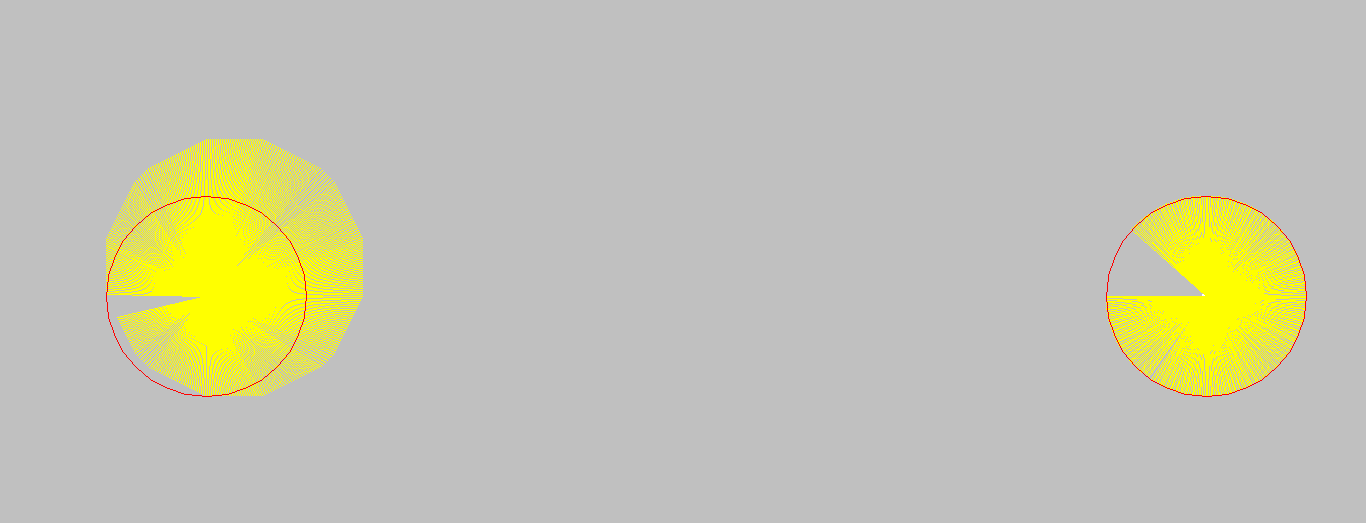
However, after it just looked horrible in my game, I started to make it more easily visible. What we developers do in such cases—yes, we write some more code. And this is the result.

On the left side, I took the pixel coordinate of the previously rotated point and rotated it by angle 1.0.
On the right side, I took the start coordinate and rotated it by the full range.
So, whereas the rotation on the left side is, e.g., from degree 53 to 54, on the right side it is from 0 to 54.

So, what is happening here? With every rotation, the rotated point must be aligned to the coordinate system; therefore, it loses precision. It is now located somewhere else than it should be and will land somewhere else due to the next calculation, which also loses some precision. But keeping the starting point and calculating the full angle solves the issue.

But still—it could be that I am using the wrong formula, so I will continue researching it.

Author
Categories Programming

Posted

A few months ago, I've got a kernel update which broke my display link driver. Therefore, my second monitor stopped showing anything. However, today it broke again.
Starting DisplayLink Driver Service...
Mär 23 09:14:49 pop-os sh[140421]: modprobe: FATAL: Module evdi not found in directory /lib/modules/6.12.10-76061203-generic
Mär 23 09:14:49 pop-os sh[140447]: Kernel preparation unnecessary for this kernel. Skipping...
Mär 23 09:14:49 pop-os sh[140447]: Building module:
Mär 23 09:14:49 pop-os sh[140447]: cleaning build area...
Mär 23 09:14:51 pop-os sh[140447]: make -j8 KERNELRELEASE=6.12.10-76061203-generic all INCLUDEDIR=/lib/modules/6.12.10-76061203-generic/build/include KVERSION=6.12.10-76061203-generic DKMS_BUILD=1...(bad exit status: 2)
Mär 23 09:14:52 pop-os sh[140905]: ERROR (dkms apport): binary package for evdi: 1.14.2 not found
Mär 23 09:14:52 pop-os sh[140963]: Error! Bad return status for module build on kernel: 6.12.10-76061203-generic (x86_64)
Mär 23 09:14:52 pop-os sh[140963]: Consult /var/lib/dkms/evdi/1.14.2/build/make.log for more information.
Mär 23 09:14:52 pop-os systemd[1]: displaylink-driver.service: Control process exited, code=exited, status=10/n/a
Mär 23 09:14:52 pop-os systemd[1]: displaylink-driver.service: Failed with result 'exit-code'.
Mär 23 09:14:52 pop-os systemd[1]: Failed to start DisplayLink Driver Service.
Mär 23 09:14:52 pop-os systemd[1]: displaylink-driver.service: Consumed 10.704s CPU time.
Mär 23 09:14:57 pop-os systemd[1]: displaylink-driver.service: Scheduled restart job, restart counter is at 229.
Mär 23 09:14:57 pop-os systemd[1]: Stopped DisplayLink Driver Service.
It turned out that the module is too old for this kernel. I remember last time I needed to do some manual work to get it working. OK, I downloaded the sources from https://github.com/DisplayLink/evdi and extracted them. Then I naively started make:
:~/evdi-1.14.8$ make
And, yes it failed.
No package 'libdrm' found
evdi_lib.c:6:10: fatal error: libdrm/drm.h: Datei oder Verzeichnis nicht gefunden
    6 | #include 
      |          ^~~~~~~~~~~~~~
compilation terminated.
I installed the developer packaged by:
:~/evdi-1.14.8$ apt install libdrm-dev
And did another make. This time it ran through without issues. After that I discovered the module folder which contained an installation script, so I started that too:
:~/evdi-1.14.8/module$ sudo ./dkms_install.sh 
journalctl -f
stopped throwing errors and my screen as also my other devices started working again.

Author
Categories Linux

Posted

Puh, that was a day.

I was changing things on a drawing and then saved it accidentally as another existing file. And worse, I accepted the dialog for overwriting. Yeah. Fxxk.

Ok. I did a huge mistake. But, still, maybe there is a way to get back the file. Luckily, the software I use for drawing 3d models uses an JSON formatted file and I remembered at least one word that shall be in the file(LedHalterArm).

After a bit of research, I found a way to read out what’s still on the hard disk.
First, I moved the file that I have overwritten and gave it a new name:

mv GameboyBeleuchtungV5.d3ddoc GameboyBeleuchtungV5.d3ddoc.bak

That shall remove the link to the part of the hard disk.

The next task was to find the position on hard disk, for that a unique string should be used and makes the search easier.

grep -a -b "LedHalterArm" /dev/sda3

Unfortunately, I already exported this as STL file so it gave me mostly unrelated results but some of them seemed to be possible. I got some results like
123123123: "name": "LedHalterArm"

Ok, let’s try again with the more specific search term.

grep -a -b "\"name\": \"LedHalterArm\""

Here, we are, I’ve got 3 results and took the last one as starting point.
48020388426:                "name": "LedHalterArm"
94465072989:                "name": "LedHalterArm"
94465073068:            "name": "LedHalterArm",

Let us see what is there:

dd if=/dev/sda3 count=16 skip=$(expr 94465073068 / 512)

Yey :) I’ve got at least the file contents from the point of “LedHalterArm” to the end. From here now I have to go back on the hard disk until I reach the beginning of the file. This process took the most of the time, because I did it step by step.

I reduced the expr value by 512 and increased the count by 1:

dd if=/dev/sda3 count=11 skip=$(expr 94465072556 / 512)

Later on I increased the steps by factor 10 then factor 50 and finally I got the whole text. For easier handling I added a clear command to the front, with that I didn’t need to care about where the beginning is of my result. Just scrolled up.

clear && dd if=/dev/sda3 count=336 skip=$(expr 94464908716 / 512)

So, I copied the relevant part from the console into a file and saved it. It worked.

Author
Categories Linux

Posted

I’m implementing a server based on Kotlin and Ktor. The goal is to send a gcode file which the receiver, a raspberry pi 1B, shall transmit to my ender 3 printer. To see the current state I used WebSockets at first. This went really well but to be honest I don’t need the overhead which comes with WebSockets because I only want to send states to whomever listen. So, the next possibility was Server Sent Events.

Server Sent Events are available for years now but not really present in people minds, so in my. However, there are a few tutorials and references to that and it was not hard to implement such events beside of one thing: Custom Message IDs.

The most tutorials to such scenarios propagate that you can pick whatever Identifier you want and just add a message listener for that. But that doesn’t work as easy as it sounds. Maybe, there is a way by implementing an own EventSource class but for that I am not experienced with JavaScript.

Just to have a bit more context. The EventSource class is in highlevel responsible to create the connection and wrap the events to a MessageEvent. One can register to:
EventSource::onopen
EventSource::onclosed
EventSource::onmessage

EventTarget::addEventListener

Usually, one would take addEventListener and put in an identifier and a function, but as said before that doesn’t work. In a forum one said that all unknown identifier will be delegated into the onmessage channel.
However, regardless which message identifier I chose, it every time landed in onmessage.

To overcome this I wrapped my data class into another with the fields “Identifier” and “Data”. So, now I can use a switch case and every message gets processed by the correct function.

Would like to know that earlier, it took me 2 days of reading references and for the workaround 5 minutes.

Author
Categories Programming, JavaScript